 PayDrift PayDrift
Payment plugin updates quietly switch methods on — Stripe Link, PayPal “Pay in 3”, express buttons — without asking. It doesn’t break checkout, so nothing alerts you; it just costs you trust, margin and clean books. PayDrift catches every change after an update, shows you the exact diff, and reverts it in one click.
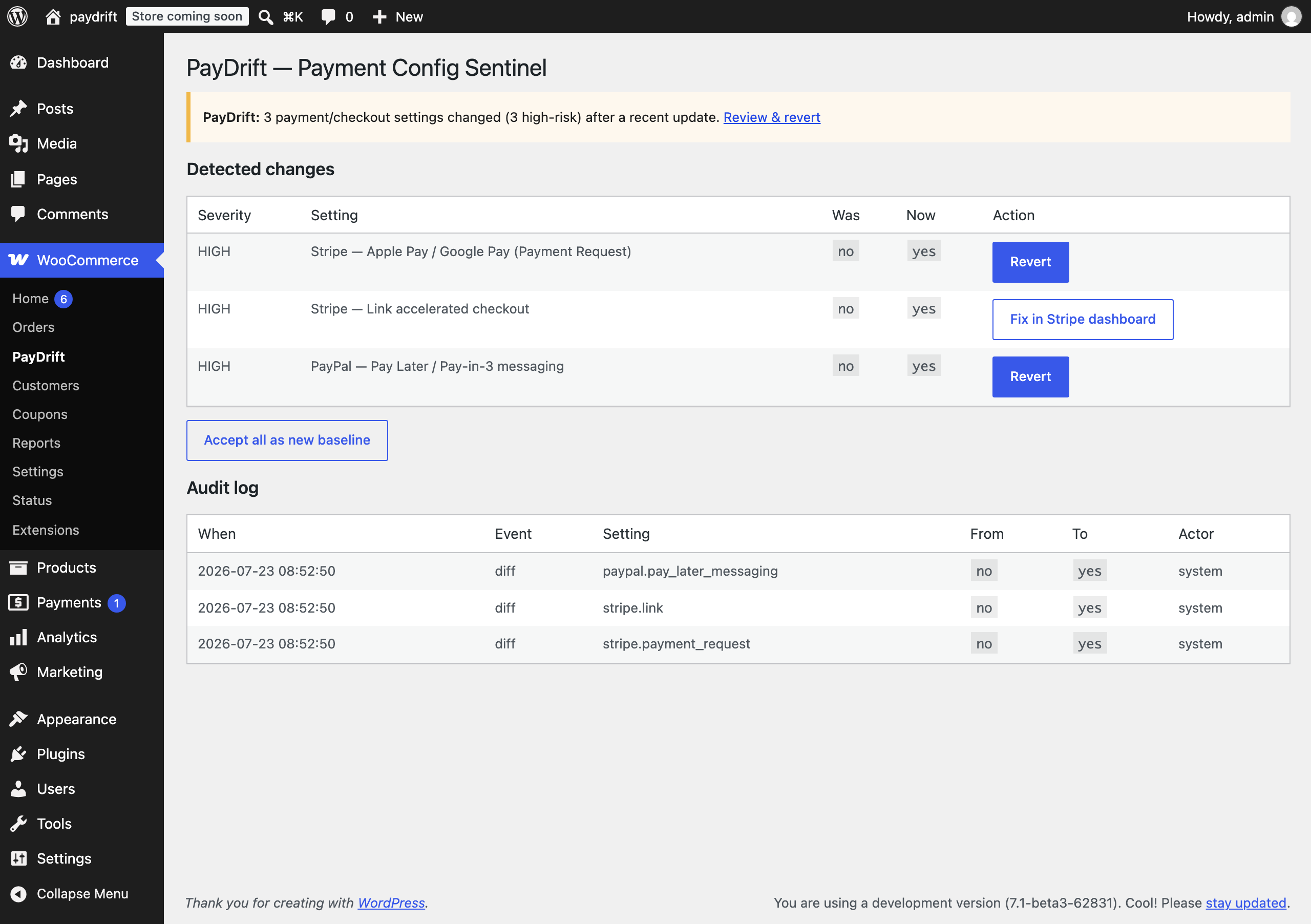
The real PayDrift screen — the exact settings a gateway update changed, each with one-click revert, and the honest “Fix in Stripe dashboard” for platform-locked Link.
This is one of the most-reported, least-solved WooCommerce problems. In store owners’ own words, from public reviews and threads:
PayDrift records a known-good baseline of your payment-method and checkout settings, and re-checks it after every plugin/theme update and once a day — so a silent change is caught immediately.
You get the exact diff (“PayPal update enabled Pay Later — was off”) as an admin notice and email, and revert the change to known-good with one click. Every action is logged.
No cloud, no account, no phone-home. And where a setting is platform-locked (Stripe Link on OAuth), PayDrift alerts and deep-links you to Stripe instead of faking a revert.
No configuration required — no cloud account, no checkout code, nothing to maintain.
PayDrift takes a baseline snapshot of your current payment-method enable-states and checkout-critical settings. That’s your known-good.
After every plugin/theme update — and on a daily background check — PayDrift diffs the live config against the baseline and classifies each change by severity.
Get the exact diff by admin notice + email. Revert any WooCommerce-controlled change in one click, or accept the new state as your baseline. Everything is written to the audit log.
upgrader_process_complete plus a daily check; classifies changes by severity.The free plugin fully solves detect-and-fix for a single store. Pro adds automatic prevention and multi-site — pay once, no monthly SaaS.
● Launching soon — Free on WordPress.org, Pro right after
| Checkout health monitors | Settings backup / activity log | PayDrift | |
|---|---|---|---|
| Catches a silently-enabled payment method | ✗ checkout still “works” | ✗ log only / manual | ✓ |
| Triggered automatically after an update | — | ✗ | ✓ |
| Shows the exact was → now diff | ✗ | partial | ✓ |
| One-click revert to known-good | ✗ | ✗ log has no revert | ✓ |
| Self-hosted, no account | ✗ mostly SaaS | — | ✓ |
Health monitors test whether checkout runs, not whether its config quietly changed. Activity logs record a change but can’t revert it. PayDrift does the update-triggered payment-config diff → alert → revert. · PayDrift is an independent third-party plugin. · See the full comparison →
Payment- and checkout-critical settings that change without you doing it — most importantly payment methods a gateway update silently enables (Stripe Link, Stripe Payment Request / Apple & Google Pay, PayPal Pay Later / Pay-in-3), plus core checkout settings like the default gateway, guest checkout and tax calculation. It compares against your last known-good baseline after every update and once a day.
No. Everything runs on your own server, alerts go through your own WordPress email, and nothing about your store leaves the site. No account, no subscription, no telemetry.
No. PayDrift never runs on the storefront or checkout — only on settings, after updates and on a daily background check. Zero impact on shoppers.
On OAuth-connected Stripe accounts, Link is platform-locked and can’t be changed from WordPress. PayDrift is honest: it alerts you and deep-links to your Stripe dashboard instead of faking a revert. Everything WooCommerce-controlled is reverted in one click.
Only the single setting that drifted, back to your known-good value — without touching neighbouring settings. Every revert is written to the audit log.
PayDrift catches every payment & checkout setting a gateway update flips — with the exact diff and a one-click revert. Self-hosted, pay once. Launching soon on WordPress.org.